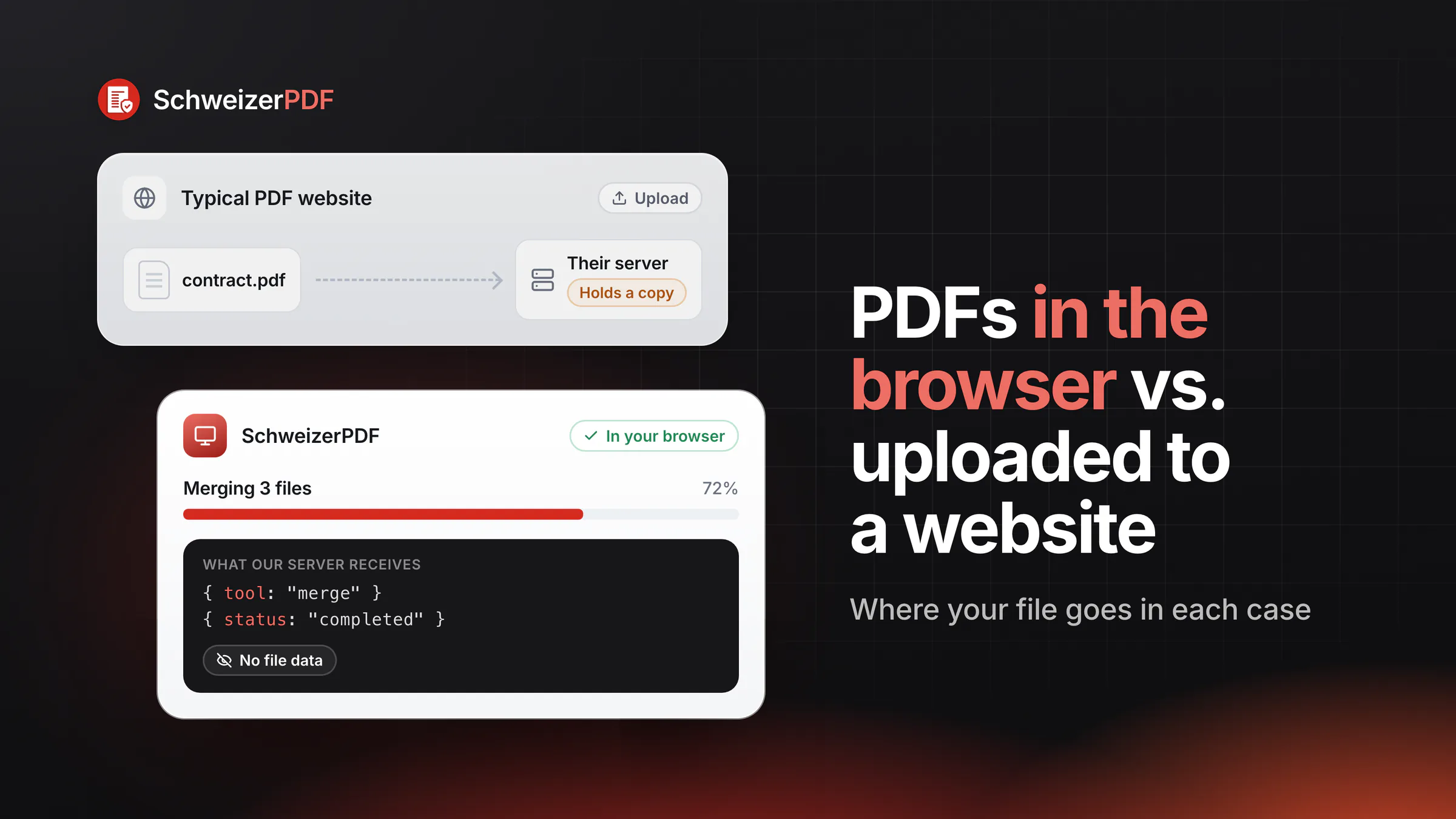
Yes, you can edit PDFs online without uploading them. A browser-based PDF tool loads its processing code into your browser and works on the file there; the document never leaves your device. An upload-based PDF website sends the file to its servers, processes it there and sends a result back. Both look the same on screen — the difference is where your document ends up.
This comparison describes the approaches in general. It does not assess any specific provider: their terms, retention periods and locations differ and change, so check them for any service you consider.
Three architectures behind PDF tools
Upload-based PDF websites
The file is sent to the provider's servers, processed there and offered for download. Your document exists — at least for a while — on infrastructure you do not control, possibly in another country, handled by the provider's staff and sub-processors under their rules.
Browser-based processing (SchweizerPDF)
The processing code is delivered to your browser and runs there. The file is read from your disk, processed in memory and saved back to your disk. The provider's server delivers the application and, in our case, counts operations — it never receives the document.
Desktop PDF software
A program installed on each computer processes files locally, like a browser-based tool. It needs installation, updates and licences on every workstation, and some programs sync files to a cloud or send telemetry — check its settings.
Browser vs. upload vs. desktop: side by side
| Upload-based website | Browser-based (SchweizerPDF) | Desktop software | |
|---|---|---|---|
| Where the file is processed | On the provider's servers | In your browser, on your device | On your device |
| Who receives the document | The provider and its sub-processors | Nobody — it is not transmitted | Nobody (unless the software syncs to a cloud) |
| Retention of your file | According to the provider's terms | None on our side; the result is your download | Wherever you save it |
| What the provider's server learns | The file, its name and everything in it | Your account and which tool you ran | Depends on the software (licence checks, telemetry) |
| Connection needed | Yes — the whole file travels up and back | Yes — for sign-in and counting runs, not for the file | Usually only for licence and updates |
| Installation | None | None | Installation and updates on every workstation |
| Very large files | Limited by upload speed and server limits | Limited by your device's memory | Limited by your device |
| Office conversions (Word, Excel) | Often available | Not offered | Depends on the software |
What an upload means for your document
An upload is not just a technical step: the moment the file reaches a server, a copy exists outside your control — on disk, in backups, perhaps in logs. Under the Swiss Federal Act on Data Protection (FADP/nDSG), handing processing to a provider, or to servers abroad, comes with conditions; they are summarised in why your PDF tool shouldn't see your documents.
None of this makes an upload wrong in itself. It means there is something to assess for every confidential file — and with browser-based processing that assessment does not arise for the document, because it is never handed over.
Where browser-based processing wins
- Confidentiality by design. A file that is never transmitted cannot be intercepted, retained, analysed or leaked by the provider.
- No transfer to assess. For documents under professional, banking or medical secrecy, the question “may we send this to that provider?” does not arise for the document itself.
- No waiting for transfers. A large scan is not sent up and down again; the time goes into processing on your device.
- Verifiable. You can watch your browser's network log while a tool runs, and the page's Content Security Policy tells the browser to block connections to any other server.
Where it has limits
- Your device does the work — large files and OCR are slower on older devices (large files).
- No Office conversions — Word or Excel conversion needs a server, so it is not offered.
- An account and a connection are needed — limits are enforced in your browser; what the account holds is on the security page.
- Device and browser must be trustworthy — extensions with access to all websites can read the page. All limits are discussed in why your PDF tool shouldn't see your documents.
How to tell whether a PDF tool uploads your file
- 1
Use a test file
Take a harmless PDF of a few pages — not a confidential one — so the test itself sends nothing sensitive.
- 2
Open the network log
Open your browser's developer tools (F12) and switch to the Network tab before you add the file.
- 3
Run a tool
Merge or compress the test file and watch the requests that appear while it runs.
- 4
Compare the sizes
An upload shows up as a request roughly as large as your file. With SchweizerPDF you see only two small requests to
api/usage/operations: the tool when it starts, the status when it ends.
Try it yourself
Run any SchweizerPDF tool with the network tab open: you will see the tool name when it starts and its status when it ends — and no file data.
How to choose
For a flyer or a public brochure, any approach will do. For AHV documents, bank statements, contracts, medical records or HR files, ask one question first: does the document have to leave my device? With browser-based processing the answer is no. If you need Office conversions, you will need another approach for that step — and should then check where that file goes.
Frequently asked questions
Can I edit a PDF online without uploading it?
Yes. Browser-based tools such as SchweizerPDF process the file in your browser. You open a web page, but the document stays on your device.
Is a browser-based PDF tool slower?
It depends on your device. Everyday jobs like merging or compressing run quickly on a current computer; OCR on long scans takes noticeably longer on an older laptop or a phone.
Why does SchweizerPDF not convert Word files?
Reliable Office conversion needs software that runs on a server. Offering it would mean receiving your files, so it is not offered.
Do I need an internet connection?
Yes, for loading the app, signing in and counting runs. The file itself is not transmitted — see where your files are processed.
Is desktop software the safer choice?
For confidentiality, desktop software and browser-based tools are alike: both process the file on your device. The differences lie elsewhere — installation and updates on every workstation, licences, and whether the program syncs files to a cloud or sends telemetry. A browser-based tool needs nothing installed and shows what it sends in the network log.
To see browser-based processing on a concrete job, read redacting AHV numbers and IBANs, browse the list of all tools, or create a free account and try it.
General information
This comparison describes architectures in general terms, not named providers, and is not legal advice. The description of the FADP is simplified. Individual services differ — read the terms and privacy policy of any tool before you use it for confidential documents.